
COLOP Printer 10: Get the Most from a Small Self-Inking Stamp
When you need a stamp that is compact, easy to carry and quick to use, the COLOP Printer 10 is an interesting option. It is one of those stamp sizes that can be easy to overlook because it sits right at the smaller end of the traditional self-inking stamp range. Yet that compact size is exactly what makes it useful for many everyday applications.
The Printer 10 has an imprint area of 10 × 27 mm and is designed for up to three lines of text. COLOP describes it as a compact stamp suitable for important information such as a name, telephone number or email address.
But choosing a stamp is not simply about finding the smallest possible body. The amount of information you need to fit into the imprint, the size of the lettering, how often you will use it and whether you may need to update it later are all worth considering.
This guide looks at the Printer 10 from that practical perspective.
What can you fit on a COLOP Printer 10?
The standard Printer 10 provides approximately 27 mm wide by 10 mm high of stamping area, with three lines being the usual recommendation. We use a maximum of 25.8 x 8.8mm to allow for the edge detail in the laser engraving and taper on the image engraved.
That makes it particularly suited to short pieces of information.
For example, it could be used for:
- A person’s name
- A name and professional qualification
- A short business name
- Contact details
- An approval or processing word
- A short instruction
- A small address
- A very simple logo or graphic
- A combination of a name and role

Four examples of how the available space can be used
One useful way to understand a small stamp is to see the difference between one, two, three and four lines of text.
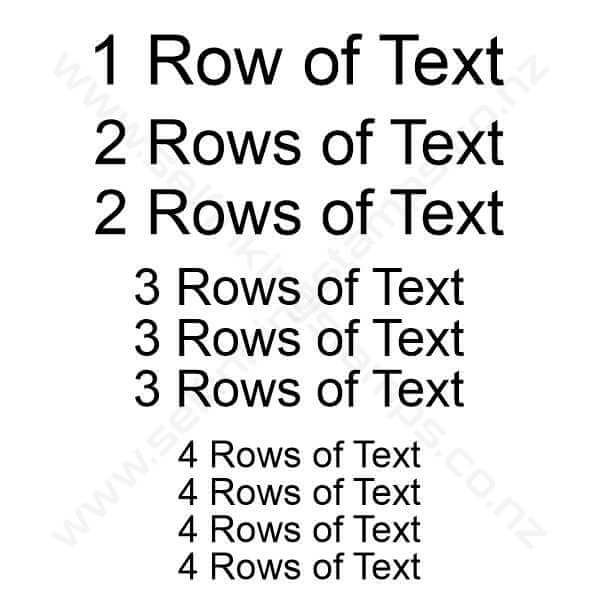
A one-line stamp can be extremely useful when all you need is a single word or short phrase.
With two lines, you have more flexibility. A person’s name could sit above their position, for example.
Three lines is where the Printer 10 becomes particularly useful. You might use the first line for a name, the second for a professional designation and the third for a short contact detail.

Four lines, however, is a good point at which to stop and reconsider the size of the stamp. The Printer 10 is intended for up to three lines, so if your wording genuinely needs four lines, a larger model such as the COLOP Printer 20 may be more appropriate. The Printer 20 provides a 14 × 38 mm imprint area and is designed for four lines.
This is an important distinction: sometimes making the lettering smaller is not the best solution. A stamp should remain readable at the size at which it will be used.
A practical example: a nurse practitioner name stamp
A professional name stamp is a good example of where a compact format can make sense.

A three-line arrangement could contain a person’s name on the first line, their professional title on the second and another relevant detail on the third.
The exact wording will depend on how the stamp is being used. For a professional stamp, it is worth thinking about what information the recipient needs to see rather than trying to include every possible detail.
A useful rule is:
If information is not needed on the stamped document, it probably does not need to be on the stamp.
This is especially relevant with small stamps. Good design is often about deciding what to leave out.
Where the Printer 10 sits among small stamps
There are comparable small self-inking models from other manufacturers, including Trodat and Shiny. In some cases, those alternatives have a slightly smaller external body.
That can be useful if absolute compactness is the priority.
However, there is another consideration: the amount of imprint area you need.
The COLOP Printer 10 has a 10 × 27 mm imprint. If you need approximately another millimetre of width or height compared with a smaller competing model, that extra space can make a surprising difference.
It may allow you to keep the lettering at a sensible size without having to move up to a substantially larger stamp.
In other words, the smallest physical stamp is not necessarily the smallest stamp that gives you the best result.
When comparing models, look at the actual imprint dimensions, not just the dimensions of the stamp body.
Choosing an ink colour
The Printer 10 uses a replaceable COLOP E/10 ink pad. The E/10 pad is specifically listed by COLOP for the Printer 10.
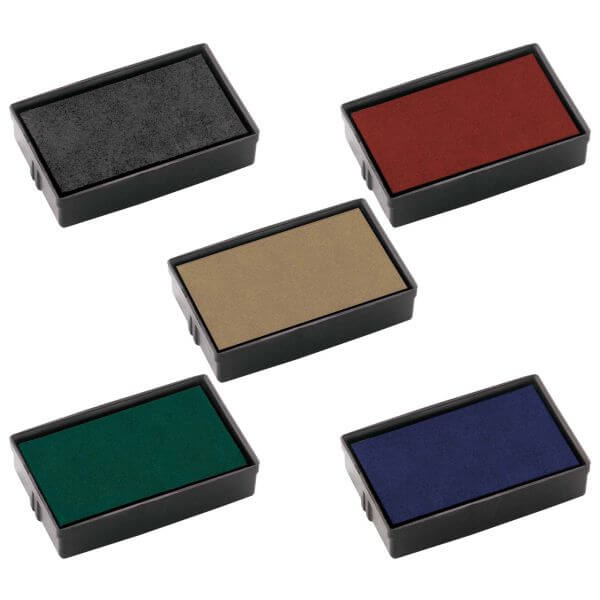
For everyday use, the standard colour choices include:
- Black
- Blue
- Red
- Green
- Dry (for alternative colours or solvent based inks)
For a standard Printer 10, it is best to use the correct replacement E/10 pad rather than trying to refill the existing pad with loose ink. Colop Premium 801 ink is the ink used in these pads.
COLOP specifically recommends replacing its self-inking pads rather than refilling them, as the replacement pad is designed to distribute the ink correctly and maintain consistent impressions.
How to replace the Printer 10 ink pad
Replacing the pad is one of the useful features of a self-inking stamp. You do not need to throw away the entire stamp simply because the pad has reached the end of its useful life.
For the Printer range, the basic process is straightforward.
- Press the stamp down slightly.
- Press the two side buttons to lock the mechanism.
- Press the side of the existing ink pad to release it.
- Pull the pad out.
- Insert the new E/10 pad with the inked surface facing down.
- Push it into place until it clicks.
- Release the locking mechanism.
COLOP’s instructions for the Printer Compact range describe the same basic pad-removal principle: press the upper section and the two side buttons, release the pad from the side, remove it and install the replacement pad until it clicks into position.
If you are unsure about the mechanism on your stamp, it is better to ask before forcing anything. The plastic components are designed to lock and release in a particular sequence.
Replacing the rubber die
Another advantage of a self-inking stamp is that the rubber die can be replaced.
This is useful when your details change. Perhaps your business name has changed, a telephone number has been updated, your professional role has changed, or you simply want to use the same stamp body for a completely different purpose.
There is no need to discard the entire stamp body.

Using an outline-style stamp design can reduce the amount of ink used for some applications.
A simple stamp such as ENTERED is a good example of how stamp artwork can be designed with the end use in mind.
Using outlined lettering rather than completely solid lettering can reduce the amount of inked rubber being used. It also creates a different visual effect, which may be useful when a stamp is intended as a processing mark rather than a formal business imprint.
How to replace the rubber die
The Printer 10’s rubber/text plate is designed to be replaced. The general process is:
- Lock the stamp mechanism so the rubber die is accessible.
- Remove any loose ink from the existing die with a piece of paper or tissue.
- Carefully lift an edge of the old rubber die.
- Peel the old die away from the stamp.
- Remove the protective backing from the replacement die.
- Check the orientation before applying it.
- Position the new die carefully and press it firmly into place.
- Release the stamp mechanism and make several test impressions.
The Printer Line replacement process involves locking the stamp, carefully removing the old plate, positioning the new plate using the manufacturer’s orientation markings and then making test impressions.
It is also worth considering replacing the ink pad when replacing the rubber die. Over time, the old rubber plate leaves an impression in the pad. A new die working against an old, shaped pad may not receive ink evenly, which can affect the quality of the new impression.
A small stamp can be a long-term tool
One of the advantages of a replaceable-die self-inking stamp is that the useful life of the body does not have to end when the information on it changes.
Think of the Printer 10 as a reusable stamping mechanism rather than a disposable item.
The body can stay with you while the rubber die changes as your requirements change. The ink pad can also be replaced when it eventually becomes worn or runs low on ink.
That makes the Printer 10 particularly practical for people who have a recurring need for a small stamp, but whose wording may change over time.
Need help choosing the right stamp?
Choosing a stamp online can sometimes feel more complicated than it should.
There are different sizes, different numbers of lines, different ink colours and different stamp mechanisms. Then there are questions about whether your logo will fit, how large the lettering should be and whether a smaller stamp will produce a readable impression.
You do not have to work all of that out yourself.
If the website feels a little scary or you are simply not sure which model is appropriate, email us and describe what you need the stamp to say and how you intend to use it.
We can help work through the options and guide you towards an appropriate solution from the range. A quick description such as “I need my name, qualification and phone number on a stamp” is often enough for us to start narrowing down the possibilities.
The goal is not necessarily to sell you the smallest stamp, the largest stamp or even the model discussed here.
The goal is to find a stamp that produces a clear, readable impression and suits the way you work.
COLOP Printer 10: when does it make sense?
The Printer 10 is worth considering when you need a compact self-inking stamp with a relatively small amount of information.
Its 10 × 27 mm imprint area and three-line capacity make it particularly suited to short names, professional details, brief messages and other concise applications.
It is also worth considering when a competing small stamp is just slightly too small for your requirements. An extra millimetre of usable width or height can sometimes mean the difference between a comfortable, readable design and one that feels cramped.
At the same time, if your design needs four or more lines, a larger model may be the better answer. The right stamp is determined by the information that needs to be stamped, not simply by the physical size of the stamp.
And because both the ink pad and rubber die can be replaced, the Printer 10 can continue to be useful even when the original wording eventually needs to change.
If you are unsure which one is right for your application, send us the details. Tell us what you want the stamp to say, roughly how often you will use it and what you are stamping onto. We can then help you work through the options and point you towards a suitable solution.
10% discount when you buy 2 or more stamps.
Self-Inking Stamps Ltd can provide bulk order discounts. When your add two or more self-inking stamps to your order, you will get a 10% discount. Contact us for larger orders for even greater discounts. Any combination of rubber stamp can qualify. Also each stamp can have a different image. Contact our team for more Information.


